When selecting Tuning > Fuel VE Table 1, is it possible to have a 2D table view there instead of the 3D table? I like the flat table view in Basic Setup > Fuel VE Table 1, but there aren't any gauges in that view, so I can't tune from it. I guess what I'd like is something very similar to the VE Analyze Live view, but with the ability to adjust values. Is it possible to change the table view in tuning mode?
Thanks,
Robert
PS Sorry if this question has been asked. I searched, but wasn't able to find an answer.
Tuning with flat 2D Table Instead of 3D
Moderator: LT401Vette
-
73Inka2002
- MegaSquirt Newbie
- Posts: 30
- Joined: Sat Sep 18, 2004 2:21 pm
Tuning with flat 2D Table Instead of 3D
Car Info:1973 BMW 2002
MS Info: MSII v3.0, Code 2.871t4b (beta), MegaTune 2.25, EDIS-4, Innovate WB, Suzuki GSX-R Individual Throttle Bodies
MS Info: MSII v3.0, Code 2.871t4b (beta), MegaTune 2.25, EDIS-4, Innovate WB, Suzuki GSX-R Individual Throttle Bodies
-
LT401Vette
- Master Squirter
- Posts: 481
- Joined: Sat Jul 16, 2005 7:07 am
- Location: Charlotte, NC
- Contact:
Re: Tuning with flat 2D Table Instead of 3D
Building custom views is slated for the next beta cycle, but..
You could sort of build one now with a little ini work...
Drop the attached custom.ini in your projectCfg folder and "Custom 2D VE Table 1 Tuning" will show up on your "Basic Tables" menu
It looks like this:
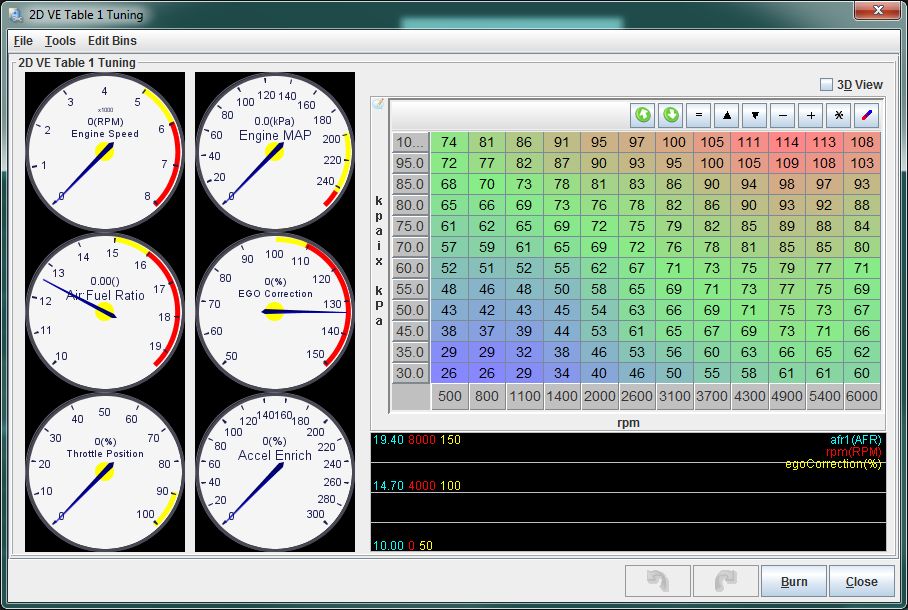
The gauges on this do Require you to use the beta TunerStudio and this ini is for MS2 B&G Firmware.
You could sort of build one now with a little ini work...
Drop the attached custom.ini in your projectCfg folder and "Custom 2D VE Table 1 Tuning" will show up on your "Basic Tables" menu
It looks like this:
The gauges on this do Require you to use the beta TunerStudio and this ini is for MS2 B&G Firmware.
You do not have the required permissions to view the files attached to this post.
Phil Tobin
EFI Analytics, helping to simplify EFI with Next Generation tuning software.
http://www.tunerstudio.com/
http://www.efiAnalytics.com/MegaLogViewer/
Android Shadow Dash MS: http://tunerstudio.com/index.php/shadowdashmsmenu
EFI Analytics, helping to simplify EFI with Next Generation tuning software.
http://www.tunerstudio.com/
http://www.efiAnalytics.com/MegaLogViewer/
Android Shadow Dash MS: http://tunerstudio.com/index.php/shadowdashmsmenu