Page 1 of 1
How to upload code
Posted: Tue Jan 11, 2011 3:50 am
by my0wn3ds
Can't understand how to upload code without Stim.
What does it mean "Power Up" or "Power Down" MegaSquirt® EFI Controller without Stim and without car?
Can I upload code at home (without car)?
Is it possible?
MS Code Update utility wrote:
For pre-Extra MS-II:
1) Short the "B/LD" jumper on the MS-II board.
2) Power cycle MS-II.
3) File->Open.
MS-II, ver3.0
Re: How to upload code
Posted: Tue Jan 11, 2011 4:26 am
by trakkies
The stim is a convenient way of powering the MS out of the car. If you wish to power the MS without a stim, you'll need to make up a power lead using a DB37 connector - or solder tails onto the back of the MS one.
Re: How to upload code
Posted: Tue Jan 11, 2011 4:39 am
by my0wn3ds
trakkies wrote:The stim is a convenient way of powering the MS out of the car. If you wish to power the MS without a stim, you'll need to make up a power lead using a DB37 connector - or solder tails onto the back of the MS one.
Do I need to power +12V to pin #37 on DB37 connector?
And ground to the case?
Re: How to upload code
Posted: Tue Jan 11, 2011 6:17 am
by trakkies
my0wn3ds wrote:trakkies wrote:The stim is a convenient way of powering the MS out of the car. If you wish to power the MS without a stim, you'll need to make up a power lead using a DB37 connector - or solder tails onto the back of the MS one.
Do I need to power +12V to pin #37 on DB37 connector?
And ground to the case?
I don't want to be rude, but are you sure you're up to this?
Re: How to upload code
Posted: Tue Jan 11, 2011 4:11 pm
by grippo
To power up MS2 in the house, you need to find the +12V battery pin and battery ground pin on the MS2 DB37 connector(see schematics in megamanual) and attach a wire to each of these pins and plug the other ends of the wire into a 9 to 12V battery or a 12V walwart (better) or other DC power supply. Using the stim you just plug its DB37 into the MS2 DB-37, then on the stim there is a small block terminal with +12V and Grnd. That is what makes it easy. You just shove a wire in each terminal and tighten the screws, then the other ends go to a battery or P/S. Plus it has the advantage that you can simulate your engine and be sure your setup works. Better to find your PW is 32 ms at 600 rpm on the bench than flooding your engine.
Once you have that hooked up you run a serial cable from laptop to ECU, just like in your car. You "power up/ down" by unplugging the walwart/ power supply/ battery then reconnecting. You have to do this because when the ECU comes up it looks for the bootload pin state and if it doesn't find it set for booting it goes permanently into engine run mode. To get it into or out of bootload you need to power up/ down.
Re: How to upload code
Posted: Tue Jan 11, 2011 11:15 pm
by my0wn3ds
grippo
Thank you very much.
I have car's accumulator at home now and can use it.
trakkies
I just want to prepare MS in advance, because I have no internet at my parking place.
Re: How to upload code
Posted: Thu Jan 13, 2011 3:53 am
by my0wn3ds
Another question about ground wiring.
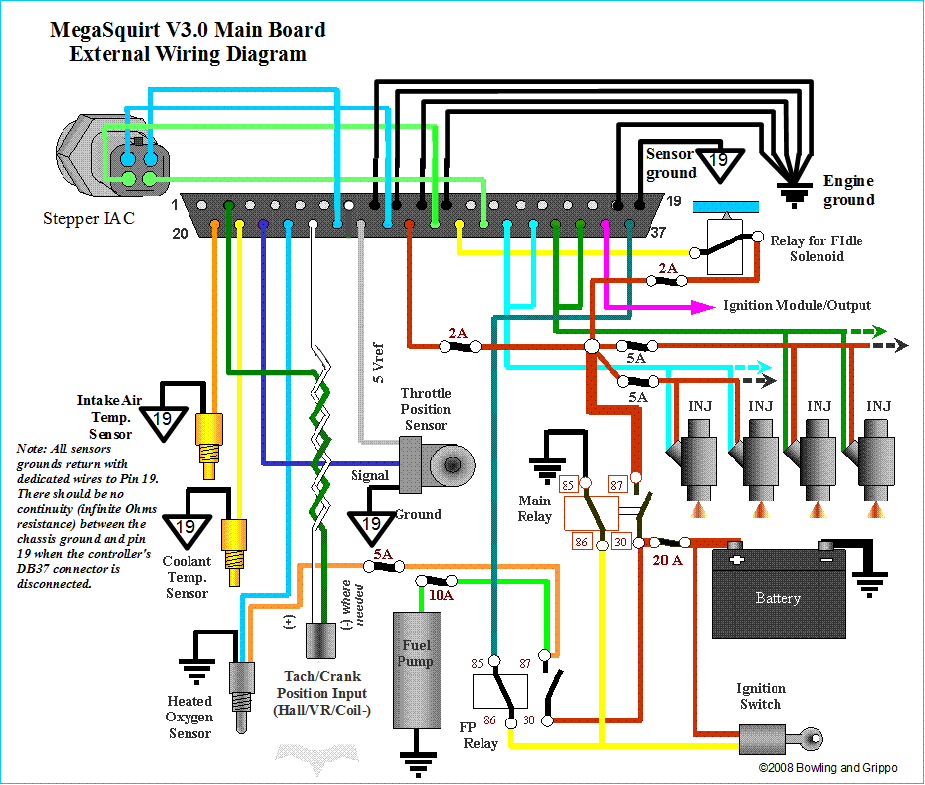
Here is standard external wiring from megamanual
http://www.megamanual.com/ms2/V3assemble.htm
http://www.megamanual.com/ms2/v3ext_wiring.gif
Ground pins are
8, 9, 10, 11, 18, 19
And this is the paper external wiring shot from DIY kit
http://www.carlibrary.ru/temp/ms2/3.0ex ... paper).jpg
Ground pins are
7, 8, 9, 17, 18, 19
What's the difference?
Re: How to upload code
Posted: Fri Jan 14, 2011 8:28 am
by my0wn3ds
Matt Cramer, thanks for answer
The ECU has several extra ground pins - pins 1, 2, and 7 through 19 are
all grounded to the same point. As long as 5 or more are grounded, it
doesn't matter which pins you use.