Troubleshoot firmware loading issue during assembly
Posted: Thu Aug 02, 2012 6:40 pm
Hello all,
I am in process of assembling my Megasquirt and I've run into a problem.
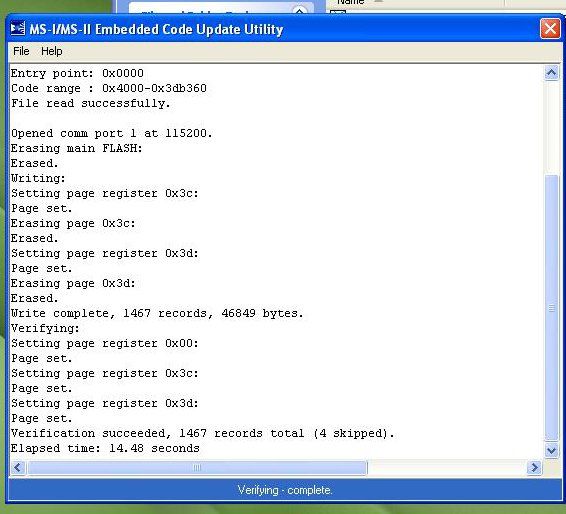
I am at step 40 (installing ECU, burning firmware, TunerStudio test). I load firmware (2.905, successfully?) @ COM1 with the downloader 2.00. (See pic below)
I pull the B/LD jumper, fire up TunerStudio, set ECU type, load INI, and try to Detect CPU. TunerStudio message: "A Controller was found on COM1. However, there appears to be no Firmware loaded. Blah, blah, etc." In the "Found" box of known devices it says "Found: {symbol string like below in Miniterm response} On Port:COM1 @ 115200 Baud".
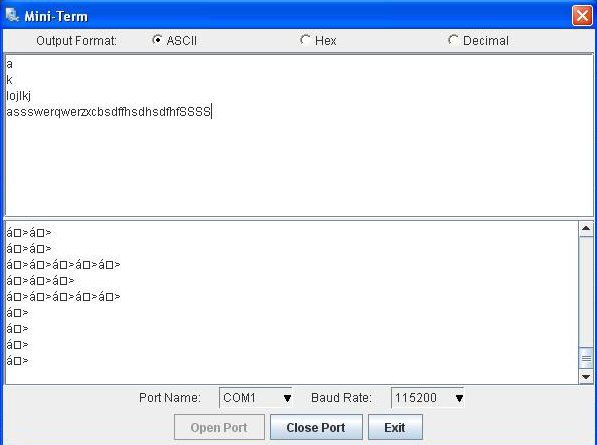
I re-load firmware, same result as above. I re-download then re-load firmware, same result as above. I run through communications troubleshooting (serial cable lookback, MB loopback; successful), CPU response via TunerStudio is not quite right. See below.
I also ran port check and got "No Connection" on COM1 @ 9600 or 115200.
What could be causing this? It seems to point towards a firmware corruption of some kind but I'm stumped. I am using an older laptop with an actual DB9 serial port, a 12v regulated power supply for the stim card (12.15v open, 12.09v connected and powering MB). I've rechecked the voltage/power supply values on 232 & CPU socket. My next step is a good re-clean of the PCB to make sure I'm not getting a short somewhere or something.
Anyone run into this before and have a resolution? I am pretty frustrated at this point. (After waiting about five years for the coincidence of ambition and opportunity to assemble this thing.)
Thanks for any help!
Will
I am in process of assembling my Megasquirt and I've run into a problem.
I am at step 40 (installing ECU, burning firmware, TunerStudio test). I load firmware (2.905, successfully?) @ COM1 with the downloader 2.00. (See pic below)
I pull the B/LD jumper, fire up TunerStudio, set ECU type, load INI, and try to Detect CPU. TunerStudio message: "A Controller was found on COM1. However, there appears to be no Firmware loaded. Blah, blah, etc." In the "Found" box of known devices it says "Found: {symbol string like below in Miniterm response} On Port:COM1 @ 115200 Baud".
I re-load firmware, same result as above. I re-download then re-load firmware, same result as above. I run through communications troubleshooting (serial cable lookback, MB loopback; successful), CPU response via TunerStudio is not quite right. See below.
I also ran port check and got "No Connection" on COM1 @ 9600 or 115200.
What could be causing this? It seems to point towards a firmware corruption of some kind but I'm stumped. I am using an older laptop with an actual DB9 serial port, a 12v regulated power supply for the stim card (12.15v open, 12.09v connected and powering MB). I've rechecked the voltage/power supply values on 232 & CPU socket. My next step is a good re-clean of the PCB to make sure I'm not getting a short somewhere or something.
Anyone run into this before and have a resolution? I am pretty frustrated at this point. (After waiting about five years for the coincidence of ambition and opportunity to assemble this thing.)
Thanks for any help!
Will

 Powered up the board first then connected the DB9 and voila, connection!

