Page 1 of 1
New to ms MS1 v2.2 and megastim v2.21 assembly issues
Posted: Tue Nov 05, 2013 4:32 pm
by Cos
I am new to megastim and just assembled my first megastim and ecu ms1 v2.2 board and having issues getting past checking the first checkpoint for powerup. I have my megastim plugged in and checked all of the components to step 19 but I cannot find 5v anywhere on my 40 pin chip socket. Is there a way I can test that I assembled my megastim correctly?
Also I am running off a 9v battery checking voltage at the new battery terminals it is at full voltage at 9.1v
Any help is greatly appreciated.
Re: New to ms MS1 v2.2 and megastim v2.21 assembly issues
Posted: Wed Nov 06, 2013 2:07 am
by trakkies
The 5 v is generated within the MS by the regulator U5. Check there is 12v (9v) on the input pin 1 and 5v on the output pin 3
Re: New to ms MS1 v2.2 and megastim v2.21 assembly issues
Posted: Wed Nov 06, 2013 5:25 am
by Cos
Thanks for the information I will try that this evening.
Its my own fault as I assembled the entire board before doing the test steps

so at this point just tracing back to see where I messed up. I have double checked all components to make sure I soldered them in where the belong and in the correct orientation (with the bagging system diy uses kinda hard to mess em up) I did notice while trying to complete the comm test that when plugging in the db9 cable I get .33v at across +- pins on the 40pin socket i.e. pin 19,20
Re: New to ms MS1 v2.2 and megastim v2.21 assembly issues
Posted: Wed Nov 06, 2013 5:06 pm
by Cos
No luck no voltage showing up at all at U5
Re: New to ms MS1 v2.2 and megastim v2.21 assembly issues
Posted: Thu Nov 07, 2013 12:01 am
by trakkies
Cos wrote:No luck no voltage showing up at all at U5
Check D10 is the correct way round.
Re: New to ms MS1 v2.2 and megastim v2.21 assembly issues
Posted: Thu Nov 07, 2013 3:47 pm
by Cos
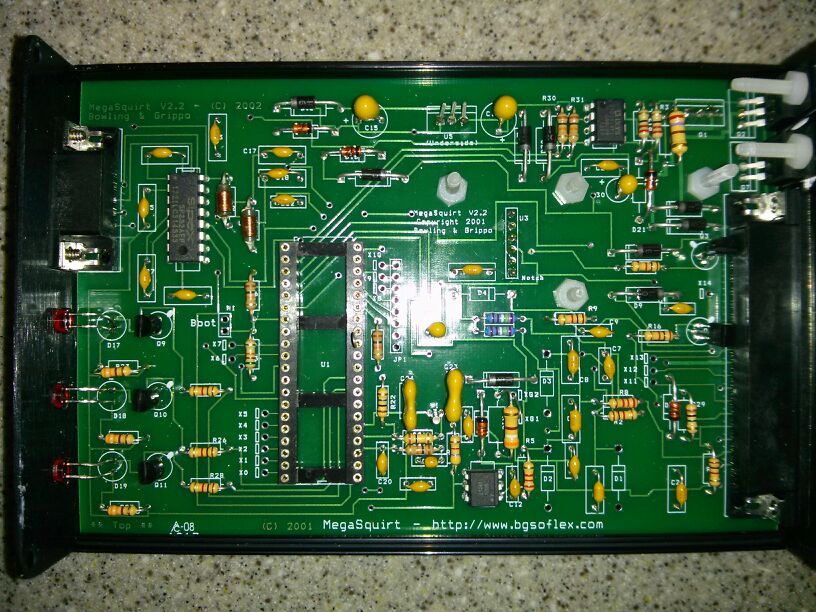
Unless im missing something I do not see a D10 nor do I see it on the megamanual list. Maybe someone could look over this picture real quick maybe someone who has done this before can see something evident I messed up....
Re: New to ms MS1 v2.2 and megastim v2.21 assembly issues
Posted: Fri Nov 08, 2013 12:05 am
by trakkies
Sorry - D13. D10 is the equivalent on the V3 board. However, it is the right way round in your pic. Check there is 12v either side of it. It is the only component before U5.
Re: New to ms MS1 v2.2 and megastim v2.21 assembly issues
Posted: Fri Nov 08, 2013 3:59 pm
by Cos
Im not seeing anything across d13, maybe I have something wrong with my stim? Not much to go wrong on it though...
I sent you a pm regarding a second ecu i purchased that was pre-assembled. Hopefully I can get one of the two working and fix the second...
Re: New to ms MS1 v2.2 and megastim v2.21 assembly issues
Posted: Fri Nov 08, 2013 8:09 pm
by Cos
I bought a second ECU already assembled since im looking to install these on two cars anyways, I cant get anything out of either Im really leaning toward the megastim I assembled, shouldnt it light up when plugging in into the ecu that is plugged into my computer?? Im leaning toward getting a 12v wall outlet to see if that does anything.
Re: New to ms MS1 v2.2 and megastim v2.21 assembly issues
Posted: Sat Nov 09, 2013 1:27 am
by trakkies
Have you checked the battery volts on the stim with it plugged in? A short is more likely than an open circuit.
Re: New to ms MS1 v2.2 and megastim v2.21 assembly issues
Posted: Sat Nov 09, 2013 5:59 am
by Cos
Im going to go over it all again, I can trace the 9.1 volts a ways through the stim board but keep losing it at a resistor...
Seems like im striking out all over with this project so far. Hopefully I didnt hurt my new ecu.
Re: New to ms MS1 v2.2 and megastim v2.21 assembly issues
Posted: Sat Nov 09, 2013 7:28 am
by trakkies
There no resistors between the power in to the stim and power out from that to the MS . Since you're not seeing 12v anywhere in the MS, it must be a pretty basic fault.
Re: New to ms MS1 v2.2 and megastim v2.21 assembly issues
Posted: Thu Nov 14, 2013 5:36 pm
by Cos
Thanks Trakkies! I got everything working correctly this afternoon I had a short I hadn't noticed.
