Help - messed up the build sequence for my MSII v3.0

The forum to discuss:
- V2.2, V3 assembly,
- V2.2, V3 troubleshooting, and
- Connection troubleshooting
Forum rules
Read the manual to see if your question is answered there before posting. Many users will not reply if the answer is already available in the manual.

If your question is about troubleshooting, configuration, or tuning, you MUST include your processor type (MS-I or MS-II) and code version in your post. If your question is about PCB assembly or modifications, you must also include the main board version number (1.01, 2.2 or 3.0).

If you have questions about MS1/Extra or MS2/Extra code configuration or tuning, please post them at www.msextra.com Such questions posted here will be moved to: a temporary MSextra sub-forum, where they will be removed after 7 days

The full forum rules are here: Forum Rules, be sure to read them all regularly.
Post Reply
sammy
Helpful Squirter
Posts: 76
Joined: Fri Jan 21, 2011 5:05 am
Location: Melbourne , Australia

Help - messed up the build sequence for my MSII v3.0

Post by sammy »

Hi
I need some help after I messed up the build sequence for my MSII v3.0

I've built a number of electronics projects over the last few months in preparation for doing the MS.
All the advice I have received was that the normal process is to install all the shortest components first, progressing through to the lager ones until the project is complete.
I guess that's the way I have always done it.

I had some spare time today so I thought I would get started on the MS project.
Although I read the Assembly guide a few weeks back, I didn't remember the part about various steps and being able to progressive test the MS during build. (yes I can;t beleive it either :shock: )
I had a print out of the component placement diagram from a while back, so working from that I started with the resistors first.

I was almost complete when I went online to read the assembly instructions.
I scrolled down and read the part about the build sequence and about doing progressive testing. :roll:


my question is this ....

With 99% of the resistors installed, does anyone know if I go back and follow the proper steps if the progressive tests will still work?

I assume it will be OK, but thought I better double check.


Also , (another question)
in the assembly instructions, it mentions jumpoers and stepper motors etc. ...

at this stage I don't think I will need to use a stepper motor, however, should I still use the jumpers in case I need to one day ???

thanks in advance

Sam

Alfa Romeo - 1979 Sedan
14pont7 - SLC WB
EDIS 4 ignition
MSII ECU v3 board v2.891 code & Relay Board
98/99 Suzuki 750 GSXR ITB, fuel regulator & TPS.
Matt Cramer
Super Squirter
Posts: 2951
Joined: Sat Jul 03, 2004 11:35 am

Re: Help - messed up the build sequence for my MSII v3.0

Post by Matt Cramer »

The tests should be OK to run anyway. And I would add the stepper jumpers - they can be useful for other things like cooling fan control.
sammy
Helpful Squirter
Posts: 76
Joined: Fri Jan 21, 2011 5:05 am
Location: Melbourne , Australia

Re: Help - messed up the build sequence for my MSII v3.0

Post by sammy »

Matt ....

much appreciated

thanks
Sam
Alfa Romeo - 1979 Sedan
14pont7 - SLC WB
EDIS 4 ignition
MSII ECU v3 board v2.891 code & Relay Board
98/99 Suzuki 750 GSXR ITB, fuel regulator & TPS.
sammy
Helpful Squirter
Posts: 76
Joined: Fri Jan 21, 2011 5:05 am
Location: Melbourne , Australia

Re: Help - messed up the build sequence for my MSII v3.0

Post by sammy »

folks

I have another question ....

I reached the point where I need to test the Power Supply.
I checked all the various points as mentioned in the manual and I'm getting 5.05 volts so that seems to be working fine.
I have a jumper between s12c & js9 so I checked for 9 volts but only found 8.55 volts.
The manual says it should be roughly 9 volts so I would have thought 8.55 so too low.

Any one have thoughts on this ????

Sammy
Alfa Romeo - 1979 Sedan
14pont7 - SLC WB
EDIS 4 ignition
MSII ECU v3 board v2.891 code & Relay Board
98/99 Suzuki 750 GSXR ITB, fuel regulator & TPS.
Matt Cramer
Super Squirter
Posts: 2951
Joined: Sat Jul 03, 2004 11:35 am

Re: Help - messed up the build sequence for my MSII v3.0

Post by Matt Cramer »

If you're using a 9 volt battery, 8.55 volts is pretty typical. There's a voltage drop through one of the protective diodes.
sammy
Helpful Squirter
Posts: 76
Joined: Fri Jan 21, 2011 5:05 am
Location: Melbourne , Australia

Re: Help - messed up the build sequence for my MSII v3.0

Post by sammy »

Thanks Matt
Alfa Romeo - 1979 Sedan
14pont7 - SLC WB
EDIS 4 ignition
MSII ECU v3 board v2.891 code & Relay Board
98/99 Suzuki 750 GSXR ITB, fuel regulator & TPS.
sammy
Helpful Squirter
Posts: 76
Joined: Fri Jan 21, 2011 5:05 am
Location: Melbourne , Australia

Re: Help - messed up the build sequence for my MSII v3.0

Post by sammy »

Two days ago I reached the point in the build where I need to test the Communications port.

Although there is some information on the forums and a little in the assembly guide, I’m getting bamboozled by all the jargon and different options and warnings about which adapter works and which doesn’t.

I’m quite disappointed that the MS hasn’t been updated to cater for USB given that most laptops haven’t had serial ports for ages and considering that comms is such a fundemential requirement for the MS.

Anyway – enough whining ...

My problem is that the USB/Serial adapters mentioned in the assembly guide are not available in my area.

As with most people, my Laptop doesn’t have a Serial port so I went out and bought a USB to Serial adapter. (Digitech XC4834) from Jaycar in Melbourne. It’s a general – plug and play – adapter that looks identical to the sample picture in the assembly guide.

Anyhow I can’t seem to get the PC set up in such a way that I can simulate a com port.

The MS assembly instructions are heavily focussed on the serial cable.
It explains how to check the cable, connection etc …all within that context.

There doesn’t seem to be much info detailing USB adapters, especially a generic plug and play adapter, and how to test them.
For examlpe... should I still connect pins 2 & 3 to create a loop back? ( didn;'t weem to work anyway1)

I will try and find another adapter that comes with installation software but I suspect they are getting harder to find too.

Meanwhile…..

1) I would like to understand if there is a way to create a virtual com port and assign it to the USB port – i.e. so I can use the generic adapter. Maybe there is some freeware or similar?

2) I’ve heard about an onboard USB card for the MS, anyone have experience with this? is it a painless solution?

3) Has anyone got a generic plug and play USB / Serial adapter like mine to work?

There is still the option of ordering the recommended one from DYIAutotune, but this will take weeks to get to me and I’m worried that after the wait it still may not work

Sam
Alfa Romeo - 1979 Sedan
14pont7 - SLC WB
EDIS 4 ignition
MSII ECU v3 board v2.891 code & Relay Board
98/99 Suzuki 750 GSXR ITB, fuel regulator & TPS.
sammy
Helpful Squirter
Posts: 76
Joined: Fri Jan 21, 2011 5:05 am
Location: Melbourne , Australia

Re: Help - messed up the build sequence for my MSII v3.0

Post by sammy »

I wnet to Jaycar and they explained that the drivers that I downloaded from their web site are the wrong ones.
They can't remove them because someone in Head office does that so they gave me disk with the right drivers.
Will try them tonight.
Alfa Romeo - 1979 Sedan
14pont7 - SLC WB
EDIS 4 ignition
MSII ECU v3 board v2.891 code & Relay Board
98/99 Suzuki 750 GSXR ITB, fuel regulator & TPS.
trakkies
Super Squirter
Posts: 1162
Joined: Tue Dec 30, 2008 3:06 am
Location: SW London, UK

Re: Help - messed up the build sequence for my MSII v3.0

Post by trakkies »

sammy wrote: I’m quite disappointed that the MS hasn’t been updated to cater for USB given that most laptops haven’t had serial ports for ages and considering that comms is such a fundemential requirement for the MS.

[snip]
I'm not sure that would solve everything. Serial is a universal protocol whereas USB requires an individual driver for each application. So you'd just move the problem from your computer to MS. I think. ;-)

Can you not find an old desktop with a serial port to make sure it's not a problem with your MS build? Once you're sure that communicates with MS you can be more certain it is a USB/serial adaptor thingie.
Dave P, London UK.
Rover V-8
MSII V3
EDIS
Tech Edge Wideband
sammy
Helpful Squirter
Posts: 76
Joined: Fri Jan 21, 2011 5:05 am
Location: Melbourne , Australia

Re: Help - messed up the build sequence for my MSII v3.0

Post by sammy »

Hi everyone,
I had to put the build on hold for a while due to work commitments, hence my overall progress has been slow, but I'm back into it again now :-)

I managed to resolve my other issue.
When I purchased the USB adapter the driver instal disk was missing and the drivers they had online were the wrong ones.
They eventually provied me the right ones and it all seems to be working ok.
I managed to progress aquite nicely, passing all the tests up to (but not including) the Clock Circuit one.

I'm at the stage of testing the clock circuit and I'm experiencing some issues that don't align to the installation manual.

Issue #1
I manually downloaded the Monitor-V2.891.abs.s19 file from the MS site, then used the Download_2.00 and followed the instructions to download to the Megasquirt.
The completion status indicated that everything went ok.
I down loaded the Megasquirt-II.2.891.Ini file and using the configurator program, I "activated" the ini file as per what i think it said in the manual.

When I started the Megatune program I got an error saying that the 'Controller Code does not match signiture ...... Expected Version was MSI Rev 2.99100 but the Received version was 0x51 ...... Serious Error'

Issue #2
The manual also mentiones during this test, when you cycle the Megasquirt (i.e. plug / unplug the stim) the LEDs will flash briefly.
This doesnt happen with my unit, so i'm wondering if I've messed somthing up somewhere?

BTW, did I mention it passed all the other tests up to this point ...

Any help / ideas/ thoughts would be appreaciated

Thanks in advance
Sam
Alfa Romeo - 1979 Sedan
14pont7 - SLC WB
EDIS 4 ignition
MSII ECU v3 board v2.891 code & Relay Board
98/99 Suzuki 750 GSXR ITB, fuel regulator & TPS.
Matt Cramer
Super Squirter
Posts: 2951
Joined: Sat Jul 03, 2004 11:35 am

Re: Help - messed up the build sequence for my MSII v3.0

Post by Matt Cramer »

Don't worry about the LEDs, and it sounds like MegaTune is on the wrong COM port.
sammy
Helpful Squirter
Posts: 76
Joined: Fri Jan 21, 2011 5:05 am
Location: Melbourne , Australia

Re: Help - messed up the build sequence for my MSII v3.0

Post by sammy »

Hi Matt,
thanks for your response.

Initially I thought the port may have been wrong too, but I checked it and it seems ok.
I went back a few steps and re-tested everything

I jumped pin2 & 3 on the output of the USB/9Pin cable and run HyperTerminal - passed ok.
Then I removed the Daughterboard and jumped pin 12 & 13 of the IC socket - passed ok (i.e. correct characters were being displayed on the screen)
Then I plugged in the Daughterboard and downloaded the code again - completed ok
Started up Megatune and got the error.

I noticed that there was a 'Car' directory and a Megasquirtv2.2 directory when I started up the config program.
I wasn't sure where to put the ini file, so I put it in both and 'activated' the files under each folder.

at work at the moment, will go back to square one and do it all over again in case I did something wrong ....

BTW, when I unplugged the MS I tried running Megatune and got the same error, kind of makes me think it may be a connection issue too.

But I don’t get it .... Everything else has worked ok so far, including the download. If I had the wrong port surely the config program and downloader would not work?

Sam
Alfa Romeo - 1979 Sedan
14pont7 - SLC WB
EDIS 4 ignition
MSII ECU v3 board v2.891 code & Relay Board
98/99 Suzuki 750 GSXR ITB, fuel regulator & TPS.
Matt Cramer
Super Squirter
Posts: 2951
Joined: Sat Jul 03, 2004 11:35 am

Re: Help - messed up the build sequence for my MSII v3.0

Post by Matt Cramer »

What COM port is MegaTune set to under the Communications -> Settings page, and which COM port did you use to load firmware?
sammy
Helpful Squirter
Posts: 76
Joined: Fri Jan 21, 2011 5:05 am
Location: Melbourne , Australia

Re: Help - messed up the build sequence for my MSII v3.0

Post by sammy »

Hi Matt

Thanks for your help...

When I got the 'Serious Error' message I chose the option to shutdown Megatune, I obviously didn't read the error message properly because it also gives you the option to continue off-line and configure your port, which I eventually did and - well - of course it's now all running correctly.

It may sound dumb, but I didn’t realise that plugging into different USB ‘holes’ on the PC would result in different ports being allocated. In the end, this was the root cause of the wrong port being configured in Megatune. :roll:

Sam
Alfa Romeo - 1979 Sedan
14pont7 - SLC WB
EDIS 4 ignition
MSII ECU v3 board v2.891 code & Relay Board
98/99 Suzuki 750 GSXR ITB, fuel regulator & TPS.
sammy
Helpful Squirter
Posts: 76
Joined: Fri Jan 21, 2011 5:05 am
Location: Melbourne , Australia

Re: Help - messed up the build sequence for my MSII v3.0

Post by sammy »

Hi everyone & Matt,

Hope I can explain this so it makes sense .,…

When I soldered Q22, to make sure I hadn't bridged the pins, I set my multimeter to 'buzzer' and tested between the Collector & Base pins, then the Base & Emitter. it didn’t buzz so I was sure I hadn’t bridged the pins.

I did this all over again for Q23, but when I checked the Base and Emitter pins, it buzzed indicating they were connected.

I looked though a magnifying glass, but it was hard to tell as the pin holes are so close on the board.
I tried running a box cutter lightly between the 2 pins to break any bridging solder, but it still buzzed.
I tried using a sucker to get the solder out, but I couldn’t manoeuvre it into position due to the other components being in the way (i.e. R56).

I eventually pulled Q23 out (damaging it in the process) , and cleaned up the holes as best I could.
I then checked the pin holes on the board (between B&E) without Q23 in place but I still got the Multimeter buzzer sounding.

I’m starting to wonder if I panicked for nothing, maybe both pins are meant to be connected through the board anyway?

So here are my questions …

1) Should my Multimeter Continuity buzzer sound on the the Base and Emitter for Q23

2) Should my Multimeter buzzer sound on the the PCB between Base and Emitter holes for Q23

3) While I was trying to get the sucker into the Q23 pins, I accidently bend over R56. As this was soldered flat on the board
I’m worried bending it over may have streatched or pull on the pins. Is there any way I can check I haven’t damaged it
either? (What’s the max resistance for R56? Is it the same as R52)

4) If I can’t find another ZTX553-ND transistor, I assume I can use any other that meets or comes close to the spec? is there
any reason why this particular trany needs to be used?

Thanks for your help

sam
Alfa Romeo - 1979 Sedan
14pont7 - SLC WB
EDIS 4 ignition
MSII ECU v3 board v2.891 code & Relay Board
98/99 Suzuki 750 GSXR ITB, fuel regulator & TPS.
Matt Cramer
Super Squirter
Posts: 2951
Joined: Sat Jul 03, 2004 11:35 am

Re: Help - messed up the build sequence for my MSII v3.0

Post by Matt Cramer »

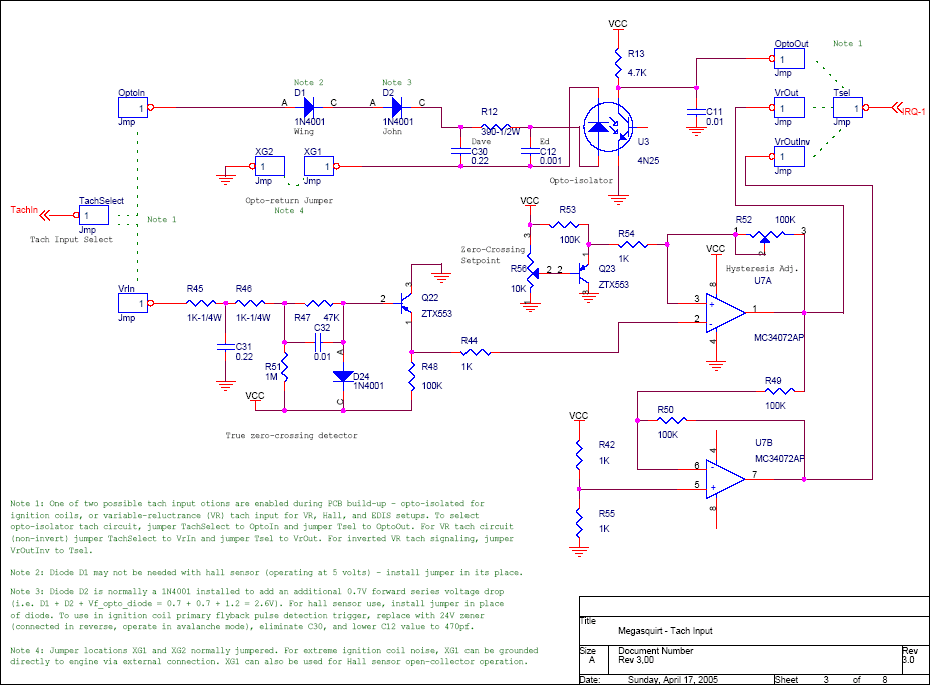
The resistance between the base and emitter of Q23 is determined by how you've set R56:

Image

And it's possible to set that to "dead short."
sammy
Helpful Squirter
Posts: 76
Joined: Fri Jan 21, 2011 5:05 am
Location: Melbourne , Australia

Re: Help - messed up the build sequence for my MSII v3.0

Post by sammy »

Hi Matt

Thanks for your help & sorry for bothering you with this stuff.

I checked and found R56 was turn right down so it gave no resistance.
As you mentioned (and as is visible in the diagram), this created a ‘Dead Short’ so there probably wasn’t a bridging problem in the first place.

Unfortunately it’s too late for Q23 so I’ll just have to get another one, but I want to know if I stuffed up R56 too .

With everything in place (except Q23) I’m getting 2.74K on R56 when turned up to max resistance.
I think this is a 10k Trim Pot, but once soldered into the board with other components in place, I’m only getting 2.74K.
I’m sure this is ok – but just checking ..

Does that sound right?

If not I’ll order one of those too.

Sam
Alfa Romeo - 1979 Sedan
14pont7 - SLC WB
EDIS 4 ignition
MSII ECU v3 board v2.891 code & Relay Board
98/99 Suzuki 750 GSXR ITB, fuel regulator & TPS.
sammy
Helpful Squirter
Posts: 76
Joined: Fri Jan 21, 2011 5:05 am
Location: Melbourne , Australia

Re: Help - messed up the build sequence for my MSII v3.0

Post by sammy »

Hi Matt

Thanks for your help & sorry for bothering you with this stuff.

I checked and found R56 was turn right down so it gave no resistance.
As you mentioned (and as is visible in the diagram), this created a ‘Dead Short’ so there probably wasn’t a bridging problem in the first place.

Unfortunately it’s too late for Q23 so I’ll just have to get another one, but I want to know if I stuffed up R56 too .

With everything in place (except Q23) I’m getting 2.74K on R56 when turned up to max resistance.
I think this is a 10k Trim Pot, but once soldered into the board with other components in place, I’m only getting 2.74K.
I’m sure this is ok – but just checking ..

Does that sound right?

If not I’ll order one of those too.

Sam
Alfa Romeo - 1979 Sedan
14pont7 - SLC WB
EDIS 4 ignition
MSII ECU v3 board v2.891 code & Relay Board
98/99 Suzuki 750 GSXR ITB, fuel regulator & TPS.
Post Reply