Troubleshoot firmware loading issue during assembly

The forum to discuss:
- V2.2, V3 assembly,
- V2.2, V3 troubleshooting, and
- Connection troubleshooting
Forum rules
Read the manual to see if your question is answered there before posting. Many users will not reply if the answer is already available in the manual.

If your question is about troubleshooting, configuration, or tuning, you MUST include your processor type (MS-I or MS-II) and code version in your post. If your question is about PCB assembly or modifications, you must also include the main board version number (1.01, 2.2 or 3.0).

If you have questions about MS1/Extra or MS2/Extra code configuration or tuning, please post them at www.msextra.com Such questions posted here will be moved to: a temporary MSextra sub-forum, where they will be removed after 7 days

The full forum rules are here: Forum Rules, be sure to read them all regularly.
Post Reply
LoupFou
MegaSquirt Newbie
Posts: 3
Joined: Thu Aug 02, 2012 3:36 pm

Troubleshoot firmware loading issue during assembly

Post by LoupFou »

Hello all,

I am in process of assembling my Megasquirt and I've run into a problem.

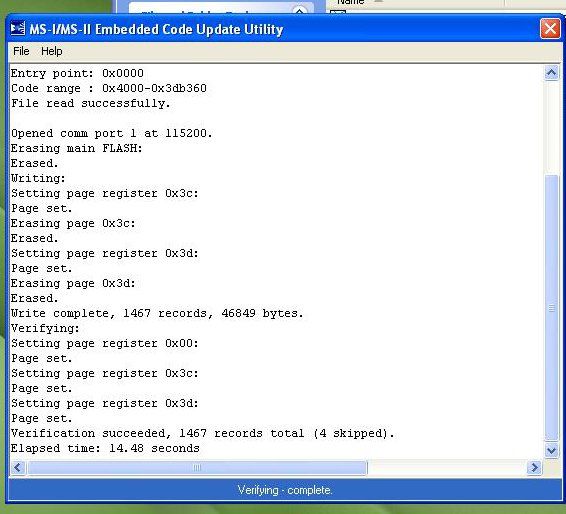
I am at step 40 (installing ECU, burning firmware, TunerStudio test). I load firmware (2.905, successfully?) @ COM1 with the downloader 2.00. (See pic below)
Image

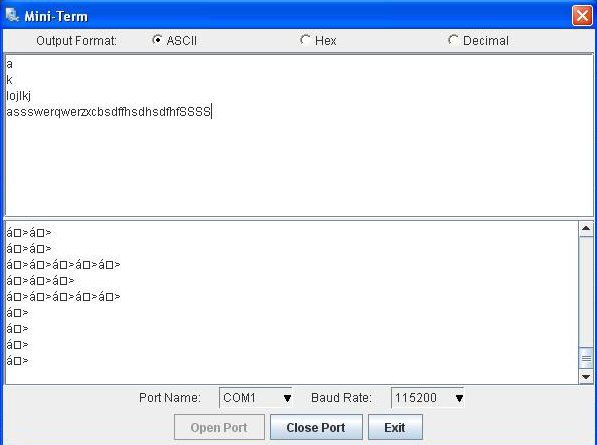
I pull the B/LD jumper, fire up TunerStudio, set ECU type, load INI, and try to Detect CPU. TunerStudio message: "A Controller was found on COM1. However, there appears to be no Firmware loaded. Blah, blah, etc." In the "Found" box of known devices it says "Found: {symbol string like below in Miniterm response} On Port:COM1 @ 115200 Baud".

I re-load firmware, same result as above. I re-download then re-load firmware, same result as above. I run through communications troubleshooting (serial cable lookback, MB loopback; successful), CPU response via TunerStudio is not quite right. See below.
Image

I also ran port check and got "No Connection" on COM1 @ 9600 or 115200.

What could be causing this? It seems to point towards a firmware corruption of some kind but I'm stumped. I am using an older laptop with an actual DB9 serial port, a 12v regulated power supply for the stim card (12.15v open, 12.09v connected and powering MB). I've rechecked the voltage/power supply values on 232 & CPU socket. My next step is a good re-clean of the PCB to make sure I'm not getting a short somewhere or something.

Anyone run into this before and have a resolution? I am pretty frustrated at this point. (After waiting about five years for the coincidence of ambition and opportunity to assemble this thing.) :shock:

Thanks for any help!
Will
Matt Cramer
Super Squirter
Posts: 2951
Joined: Sat Jul 03, 2004 11:35 am

Re: Troubleshoot firmware loading issue during assembly

Post by Matt Cramer »

It could be a dead CPU, but first, please make sure you don't have the bootloader pins still jumpered.
LoupFou
MegaSquirt Newbie
Posts: 3
Joined: Thu Aug 02, 2012 3:36 pm

Re: Troubleshoot firmware loading issue during assembly

Post by LoupFou »

Nope, I followed the directions; put the B/LD jumper on to load firmware and remove it when load is complete.

My only other thought is maybe a crystal is bad? Looks like there are two, one on the CPU and one on the MB. How would I go about checking those? I have access to a o-scope at work.

I do also need to finish my re-clean of the pcb, I didn't get the chance to finish last night. Here's to hoping that it's just an invisible bit of flux or something causing all my problems! :cry:

Thanks,
Will
Matt Cramer
Super Squirter
Posts: 2951
Joined: Sat Jul 03, 2004 11:35 am

Re: Troubleshoot firmware loading issue during assembly

Post by Matt Cramer »

The main board crystal doesn't do much of anything.

Try seeing if it will behave correctly if you turn it on with the DB9 unplugged and then plug it in. Some early MS2 cards can go into bootloader mode if powered up hooked to a serial port.
LoupFou
MegaSquirt Newbie
Posts: 3
Joined: Thu Aug 02, 2012 3:36 pm

Re: Troubleshoot firmware loading issue during assembly

Post by LoupFou »

Aha! Thank you sir!

That seems to have been the problem. :oops: Powered up the board first then connected the DB9 and voila, connection! :yeah!:

Now to continue the assembly. 8)
hardude
MegaSquirt Newbie
Posts: 1
Joined: Wed Dec 26, 2012 4:50 am

Re: Troubleshoot firmware loading issue during assembly

Post by hardude »

hello! I have one problem with ms2 (v.3.0). If I plug serial cable laptop and mega and then put megasquirt power on, that resets firmware. What I can do for that? If I remove serial cable from mega, power up megasquirt and then plug cable back everything still there. :(
Matt Cramer
Super Squirter
Posts: 2951
Joined: Sat Jul 03, 2004 11:35 am

Re: Troubleshoot firmware loading issue during assembly

Post by Matt Cramer »

Don't power it up with the serial cable connected to the laptop.
Post Reply
